Axle
A dark parts-counter theme for car parts and accessories shops, with a deep mega menu of systems.
Made by Orbit Commerce
- Made for
- Any kind of shop
- Catalogue
- Large
- Built for a large range.
- Updates
- Free
- Every new version
- Updated
- 11 Nov 2026
- Version 0.1.0
What Axle does well
Choose your vehicle strip
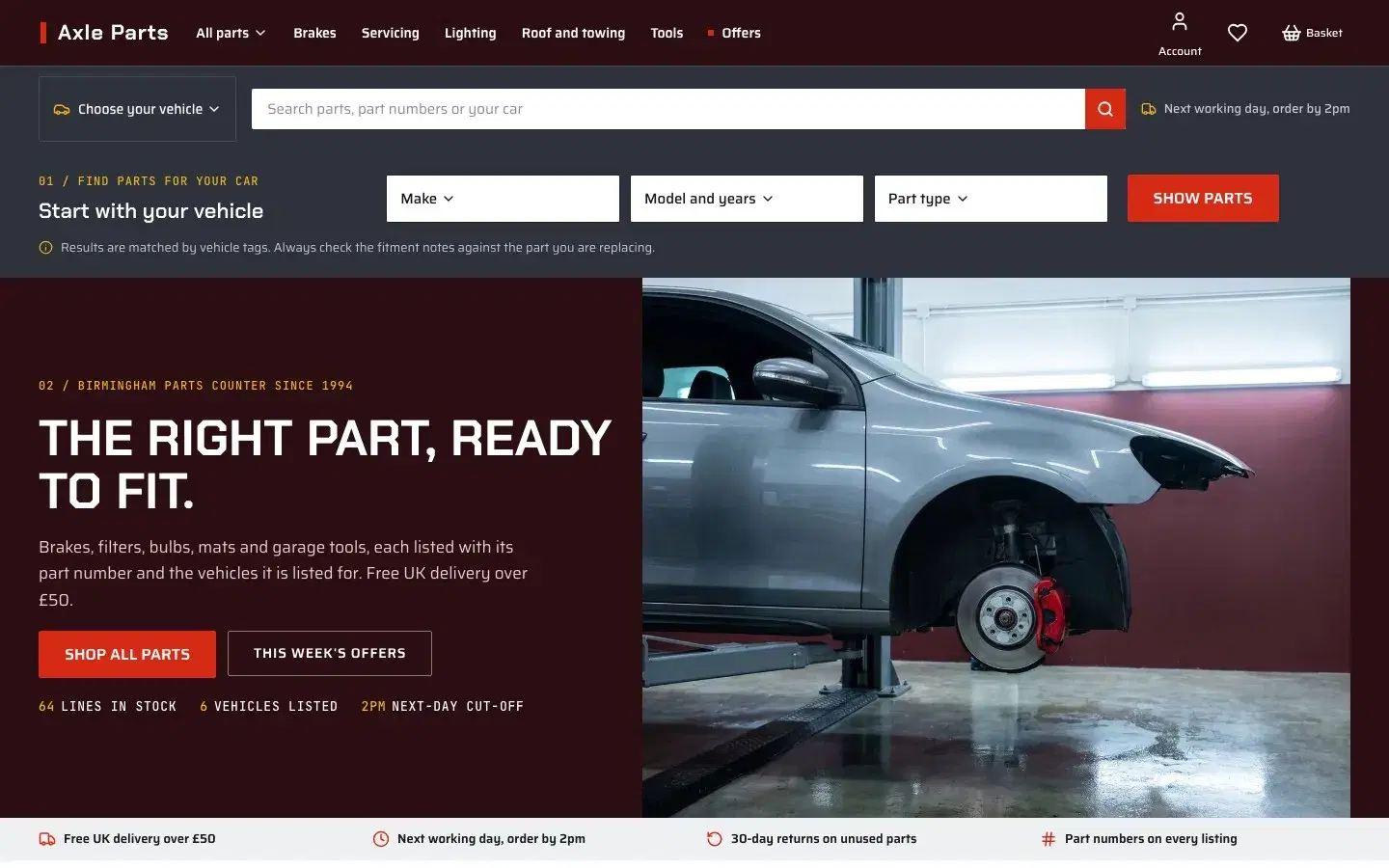
A choose your vehicle strip and a header vehicle picker narrow the parts by the tags on each product.
Exploded-view tap markers
An exploded-view photo of a front corner carries tap markers that point to each part.
Part numbers first
Product pages lead with the part number and a fitment note, with tabs for specs and install notes.
About Axle
Axle is built for car parts and accessories shops with big catalogues and customers who search by vehicle and part number. A deep oxblood header carries a mega menu of systems with promo tiles, and a gunmetal second row holds a Choose your vehicle list and a wide search. The home page opens with a vehicle finder by make, model and part type, then systems tiles, a weekly offers rail, an exploded-view photo with shoppable markers, kits and workshop guides. Collection pages have a left filter column for vehicle, position, colour and size, with quick add on every card. Product pages lead with the part number and a fitment note, with tabs for specs, fitment notes, what is in the box and install notes, plus a sticky add to basket bar. Vehicle results come from product tags, and the copy always asks shoppers to check the fitment notes.
Pages
A theme is a whole shop, not just a home page. Open any page with an address in the live demo.
- HomeOpen in the demo
- Category pageDesigned and included
- Product pageDesigned and included
- CartOpen in the demo
- Search resultsOpen in the demo
- BlogOpen in the demo
- Blog postDesigned and included
- Page not foundDesigned and included
- About UsOpen in the demo
- ContactOpen in the demo
- Delivery And ReturnsOpen in the demo
- FaqsOpen in the demo
- Fitment HelpOpen in the demo
- Privacy policyOpen in the demo
- Terms Of ServiceOpen in the demo
Colours and type
Axle sets its colours, fonts and buttons once, in style settings, and every page follows. Change them there and the whole shop changes with them.
- Background#FFFFFF
- Alternate background#EEF0F2
- Text#15171A
- Muted text#5C636D
- Primary#D62A14
- Secondary#2B0E12
- Accent#F0B323
- Border#D9DDE2
Headings
Axle
Chakra Petch (shown here in our own face)
Body text
Every page picks up these colours and faces from style settings, so one change restyles the whole shop.
Saira (shown here in our own face)
Its buttons, as the theme sets them.
Built in
Read from Axle's own pages: each of these is part of the theme as it installs.
Header and navigation
- Sticky header
- Mega menu
- Search in the header
- Cart drawer
Product pages
- Image zoom
- Full-screen image gallery
- Colour and size options
- Stock level
- Buy now button
- Sticky add to cart
Category pages
- Sort options
- Grid and list views
- Filters
Marketing and content
- Newsletter sign-up
- Blog
Pricing
Axle is a one-off £159, not a subscription.
£159one-off, ex VAT
A single charge
The price shown here is before VAT, which your dashboard adds at checkout. There is no monthly fee for the theme.
Free updates
When a new version is published, you can update to it from your dashboard at no cost.
For one shop
The licence covers one Orbit Commerce shop.
Try it first
Axle runs on its own demo shop, so you can click through a product page, a category and the cart before you choose.
Questions

Start with Axle. Make it yours.
Every plan starts with a two-week trial. Build the shop first and choose a plan when you are ready.
Pick a theme. Start selling.
Every plan starts with a two-week trial. Build the shop first and choose a plan when you are ready.